
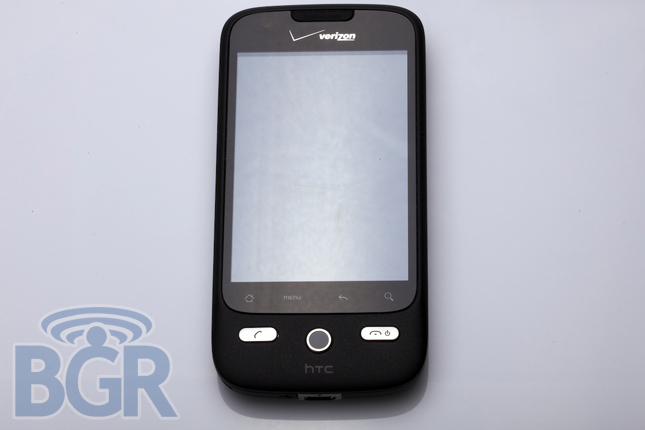
HTC DROID Eris OTA update hitting handsets about… now

Verizon just let us know that an OTA update for the HTC DROID Eris is being pushed to handsets at about midnight this evening. The ROM is 1.16.605.1 and the radio version is 2.32.40.11.09 for those inquiring minds. Just as Motorola’s OTA update worked, the DROID Eris will as well — slowly to a small group of people, then expanding over the coming days. Here’s a brief list of some of the fixes and you can always check the documentation on Verizon’s site.
- While on a call and the device is in screensaver mode, pressing the
- End key now takes the device out of screensaver mode, and a second press will end the call.
- On-call mute and speakerphone icon functionality is enhanced.
- Upgraded functionality after activation eliminates the delay users were experiencing in receiving their first call.
- Device now switches effectively from 1x mode to 3G.
- Device no longer requires users to reselect a default email after power-cycling.
- SMS and MMS messaging delivery is improved.
- Eighty-character MMS/SMS message subject lines are now allowed
- Improved picture messaging functionality allows messages from LG phones to be opened.
Read [PDF link]



Just got the update last night. Everything appears the same, except for one problem. When the phone is locked, and you swipe down to open/unlock, you have to swipe many times. Something is screwed up with the UI. It REALLY becomes a problem when the phone is ringing, and you can’t answer it b/c you can’t unlock the phone…
Start with your finger on the lock bar (the bar running across the screen) and drag down.
This is a change from before (where you started high on the screen and dragged down). Would be nice if they documented THAT change.
I have the same problem , you have to swipe several times to unlock and you have to swipe lower on the screen
I just received another OTA update last week 1/19/10 I have no idea what that one was
My Alarm Clock has gone silent after the update. It will vibrate, but no ringer?
Liked.
+5
Had the same issue after OTA. Looks like the update sets alarm vol to zero. Go to the alarm details. Select the alarm ring tone and while on that screen, use the volume buttons on the side of the phone to increase alarm volume. This fixed it on my Eris.
Liked.
+7
i did what you said, but it still wont ring!
Change the volume when you are on the screen that lists the different ring tones, it fixed my problem
Some MMS still doesn’t work but the phone is INCREDIBLE smoother and efficient. Patiently(formerly ANGRILY) waiting for the OS update to Droid 2.0.
My MMS wouldn’t work either. Tried calling Verizon, not help whatsoever! Said they needed to put in a service request for it, but never got back to me. Didn’t even have me check the settings to make sure they were all correct. After getting off the phone with Verizon, I decided to try performing a Factory data reset. It did the trick! My MMS now work and I haven’t had a problem since. Give it a try. Just make sure to back up everything and make a list of the apps you downloaded so that you can redownload after the reset.
Still no MMS, was on the phone with customer service for 30 minutes and still nothing…1 MMS from an LG phone worked, the rest didn’t…MMS from blackberry is a no-go now as well…
Received my OTA update (in CA) the evening of 12/14. Moving between screens is MUCH faster. I’ve not noticed any other functionality differences, good or bad, but it should be noted that I do not seem to be using the phpone to it’s full potential like others on this board. Some of the shortcuts for downloaded apps disappeared, but the apps themseleves were still installed on the phone. I just needed to re-drop the shortcuts. Other than that, my wallpaper, scenes and other settings remained the same. Can’t wait for 2.0 in 2010!
Someone help my Eris updated fine never had any problems until today my alarm won’t make a sound
ALARM FIX! – Set you alarm for like 2 mins in the future. Now when it rings it should either vibrate only (if you have that set) or just come up as if it is playing a ring tone but with no noise. NOW while its going off use the buttons on the side to increase the volume. Had the alarm go silent after DL a few apps, this fixed it both time.. of course it doesn’t fix the fact that it goes silent after certain DL but thats another issues all together
Should note i use Open Alarm App, lets you use ringtones as opposed to the standard alarm.. Free too
My alarm clock won’t ring either. Are they going to fix it?
Change the volume when you are on the screen that lists the different ring tones, it fixed my problem
Same here… Alarm will not ring but it will vibrate…. Don’t know if this has anything to do with the update, but I was able to sync two exchange email accounts. I was told over and over again by VZW reps that both the Moto Droid and Eris would only handle one (Almost got the Storm 2). If it continues to run smoothly…. Moto Droid time.
ditto … set my alarm last night but woke up 30 minutes pase the set time. good thing my home phone rang. i called htc tech support and the guy didn’t seem to know much, he said it just might be my was my app of the ringer toggle widget … which i’ve had for three weeks.
Just bought 2 eris phones about 3o minutes ago. Good thing I didn’t know about this vibrating when press the bottom 4 keys — It’s driving me CRAZY. Most people are saying you can’t turn this off. I picked out the phones myself, so I hope my wife doesn’t notice the “4-button-buzz”, or I’ll be getting “that look” for the next two years.
Verizon, HTC, somebody, please release something to turn off the key buzzing,
Alarm fix:
I was pulling my hair out about the alarm issue. I could get it to vibrate, but it wouldn’t make any sound!!
It’s stupid easy to fix–go to your alarm, select the sound. On the pop up screen that lists all of the available alarm sounds, press the volume up rocker switch on the side of the phone. All of a sudden, your alarm sound will be turned up.
I did it for the first time last night, woke me right up this morning
Grats on finding this the night before! I missed dinking with the alarm update last night, and I rely on the alarm so much that I epic failed at waking up on time for work.
Oh Noes!
My HTC Droid Eris will not keep my favorites that I have selected. When I apply the people widget> Add a favorite> Select the person and desired phone number> the person populates.
I then swipe to another screen.
When I come back to the people widget, my favorites disappear. I have tried going in through my “people” and adding favorites that way so the People widget will pick up those favorites, but the same results happen where they get wiped out.
Any suggestions? There seems to be something wrong with the phone because I haven’t seen any other postings on this anywhere!
After writing to HTC, they didn’t directly give me the answer, but put me on the path to figuring it out for myself. I found out that my favorites were being overwritten by the location from which the phone syncs to.
Each of my “People” had “Google” to the far right of their name in my contacts list. This gave me the idea to just modify what data is sync’d from my phone from Google.
Settings> Data Syncronization> Google> Here I unchecked Contacts, Calendar, etc.
When I added my favorites after doing this, they now remain in the People widget.
how do you edit the “people”,”phone”, and “google” for each contact
what about the big release to 2.0 or 2.1?
Q1 2010.
I’m not going to upload though if the HTC Expresso update pictures that have been floating around the internet show the HTC Sense update that will come with 2.0 or 2.1. Free navigation is not worth that ugly UI.
thanks guys for the comments about the alarm good thing i came in here cause i had the same problem with the alarm and i tried ur suggestions and it works now this phone is offically awsome
Has anyone noticed that after the update, the functionality of attaching a calendar event to an SMS or MMS has quit working? Before I could tell it to attach and scroll through each month and find any event, but now it will only go straight to the “agenda” screen with no way to switch to the calendar. This limits events to within 24 hours. I absolutely cannot figure out how to get around it. I can search for an event, but once it finds it it only lets me open it to edit it, not attach. I have been trying to send my an appointment to my wife all day, but no luck.
I’d appreciate any input!
Change the volume when you are on the screen that lists the different ring tones, it fixed my problem
I also have the same problem with not being able to look at any pictures that anyone sends me. I miss everything now! Help!
i am having an issue with people sending me picture messages and me not being able to get them because it refuses to download it. instead pops up in notification bar saying that it will try to download later and wont work then either. what do i do!!! my business needs me to view picture messages people send me and its the entire reason why i bought this silly thing in the first place. someone help?
Liked.
+6
I have the same issue with my picture messages, it does not download the pictures
Trying to figure out how to get SPEAKER volume up on new Eris (1.23.10). Have not found a definitive word online. Could anyone point me in the right direction? Thanks . . .
I went to verizonwireless had ringtones sent to my phone but dont seem to know how to set them to ringtones. If i tap on them they play but cant find the option button to set them for ringtones. Getting frustrated
this phone is hot