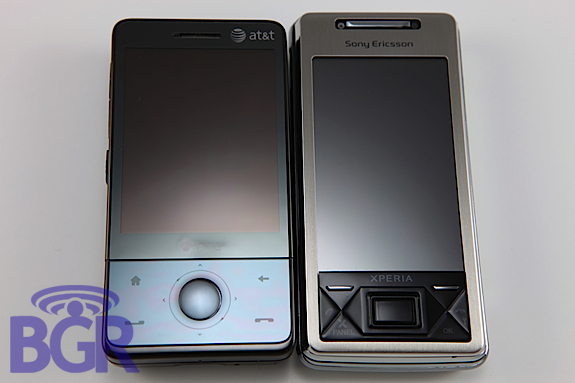
This right here people is the day you’ve been waiting for. The two best Windows Mobile devices out there; the Sony XPERIA X1 and the AT&T HTC Fuze. We put them head-to-head in a bunch of tests and categories just so we could help make your decision a little bit easier. They are both fabulous phones, both are manufactured by HTC, and both are practically identical in terms of hard specs. But which one comes out on top? Which one are you going to drop a weeks pay on? Well, hit the jump and see what’s really hood with the X1 and the Fuze!
Screen:
Sony XPERIA X1a:
The XPERIA uses a WVGA resolution for it’s 800×480 display, and while it’s absolutely gorgeous, we couldn’t help but feel as if it might be a little too big. The menu items are pretty small, and while it’s ok to use if you’re banging away on the soft key buttons on the front of the device, it’s kind of tricky to use your finger to select these most of the time. What we love about the XPERIA’s display is that there are no grainy artifacts, and the screen barely requires any pressure to register input. Not a bad thing, a good thing. But that might come down to personal preference.
AT&T HTC Fuze:
Ah, good ol’ VGA. The Fuze rocks out with a 640×480 display, and while it’s not as roomy as the Sony X1, it’s more than big enough to cram whatever you want into the screen. Most applications look great in this resolution, and hey, even Skyfire works! The only downside about the Fuze’s screen is that while it’s very, very nice, it’s a little grainy if you want to get nitpicky, and the pressure required to register a touch can get a little annoying.
Keyboard:
Sony XPERIA X1a:
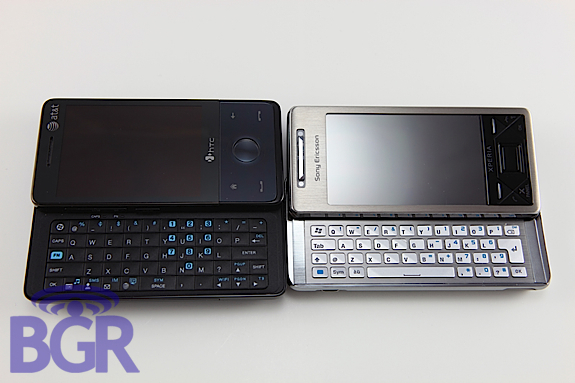
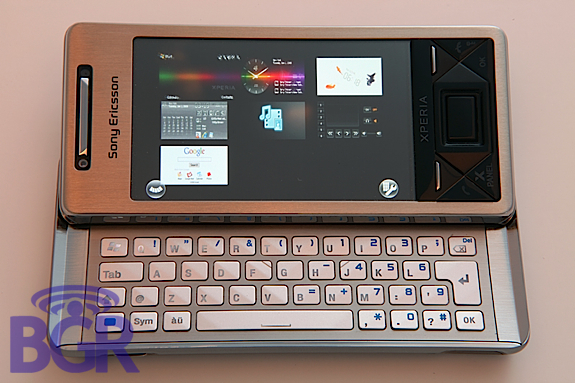
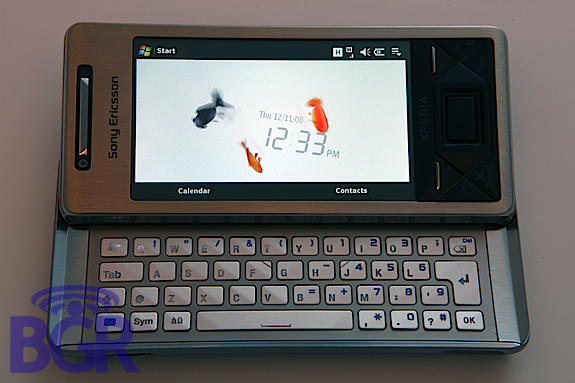
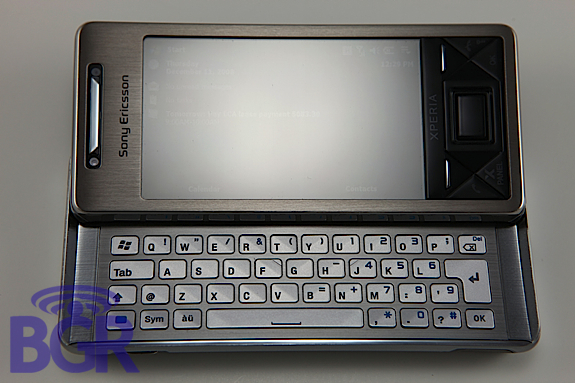
The X1 makes use of a 3-row QWERTY keyboard (the fourth row being the spacebar, extra buttons like “OK”, etc). We said some pretty harsh words about it in our mini-review back in the day, but we’re actually loving the keyboard now. Our gripes were that the keys were a little too flush with the case, but it seems as if that has been cleared up now. The keyboard by no means protrudes, it’s still very flush, but it’s a lot better than the unit we toyed with previously and we have no problem banging out emails or IMs on here. The only complaint would probably have to be that there isn’t quite enough room to type 100% perfectly on the top row of keys. We would have loved a tiny bit more space in between the key and the front sliding mechanism, but once you get used to it, you’re pretty much good to go.
Final critique would have to be the backlighting. We understand the keys are metal and everything, but there is really no excuse. Once you have the layout sort of memorized you’ll make out alright, but the lighting is very dim unless you are in total darkness and it doesn’t even fully light up key like it should.
AT&T HTC Fuze:
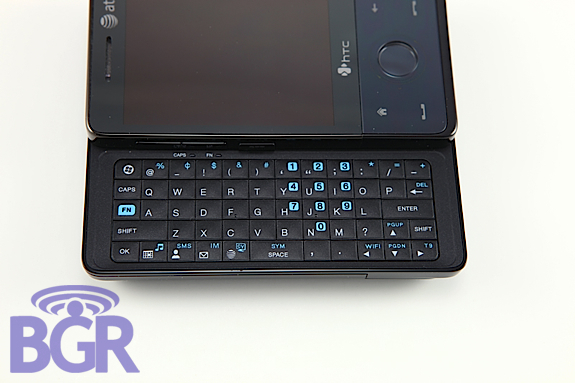
The Fuze uses a 4-row QWERTY keyboard and is pretty much what you’d expect from HTC. The keys are not rubberized like they were on the Herald or Tilt, but they feel really good. There’s enough tactile feedback to minimize mistakes and the layout is near perfect. But there are a couple things that bug us, though… For starters, while we love AT&T for kicking the crap out of whoever designed the initial Touch Pro keyboard and making them add Start and OK buttons, there is also a negative. Instead of the numbers being at the top row of the device they are placed in a standard number pad format over the keys. That’s all well and fine, but what this did is push the letters to the side of the keys so they could fit the numbers in. If you’re not typing in perfect daylight this can kind of get annoying because when you go to hit a letter to type, you actually hit the very edge of the key and not the middle of it since the letters are pushed over. It’s not the end of the world, just a minor annoyance that we would have liked to be fixed. All in all, it’s a very good keyboard; one of the best keyboards on a Windows Mobile device
OS:
Sony XPERIA X1a:
While Sony doesn’t come close to offering anything like HTC’s TouchFLO 3D, they have made great use of something called “Panels.” There are about eight pre-loaded that range from the standard Windows Mobile homescreen, to a Google homescreen, to even a Facebook homescreen. The Facebook panel is straight up addicting. Like crack addicting. Really. Why do you think it took us so long to write this review? In addition to the aforementioned panels, there is also a music player panel, and customized homescreen ones where you can add in some RSS feeds and have them display right there. Very sneaky, very cool. Navigation on the XPERIA is just the regular Windows Mobile stuff, though, and Sony didn’t do much in terms of customizing the OS. For an expert WinMo user this is obviously not a problem, in fact, you might even prefer this, yet we can’t help but think how many additional sales Sony would have gotten if they had done a little more. Well, they probably would have got a lot more sales if the damn thing was shipping and wasn’t $800, so let’s not kid ourselves there.
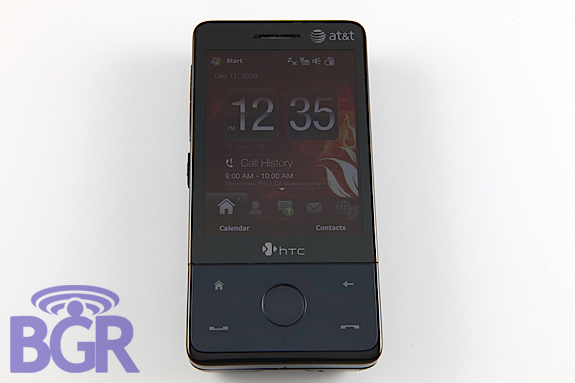
AT&T HTC Fuze:
The Fuze uses HTC’s TouchFLO 3D which runs on top of the standard Windows Mobile junky OS. HTC has done wonders in this regard, and they don’t plan on stopping. If you’re not familiar with TouchFLO, you could sort of think it as a very complex skin, but the whole purpose of it is to minimize the actual user interaction with Windows Mobile as a whole. That’s a good thing, not a bad thing. You can always just rip into the regular Windows Mobile until your heart is content, but TouchFLO is the best Windows Mobile experience out there. In the OS department, where the Fuze differs from the X1, is that HTC has pretty much combed through everything to try and bring it up to snuff. You can’t polish a turn (well, you actually can) yet HTC has been able to deliver an amazing product that makes Windows Mobile far more usable. For instance, the soft keyboards. Instead of having to slide the phone open like the XPERIA to enter text (unless you want to use the atrocious standard Windows Mobile keyboard, or one of the other rudimentary text entry options), you can just quickly touch type and be on your way. For a longer typing engagement, just slide out the keyboard. This approach works wonders, and it’s actually one of the big complaints we had with the T-Mobile G1.
Battery:
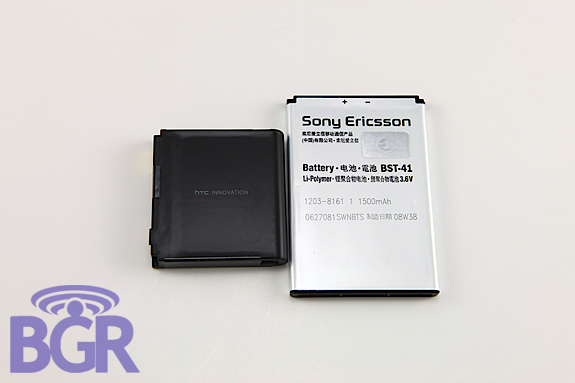
The X1 makes use of a 1500mAh battery while the Fuze uses a 1350mAh battery. No question which one lasts longer, right? Well, not so fast. We’d say they are practically equal in terms of battery life, and if they aren’t exactly equal, the Fuze beats the X1 by a tiny bit. This as usual depends on your usage patterns, but we found both handsets lasting well into the late evening from an early morning full charge. If you’re a power user, you’ll want to pickup a second battery or car charger for either device.
Connectivity:
Both handsets are practically identical in this regard — quad-band GSM/EDGE, tri-band HSDPA, Wi-Fi, Bluetooth, IrDA, etc. We noticed that the Fuze holds onto a 3G signal a tad bit better than the X1 but this wasn’t really a concern as both units 99% of the time mirrored each other in the signal department, and both would hold onto low signals in fringe areas very well. The only part where we can see these two differing in the connectivity department would be Wi-Fi. Wi-Fi just plain sucks on the X1. We’re not sure why. It might be the placement of the Wi-Fi antenna, it might be the semi-metal casing — we’re just not sure. But even standing 5ft away from one of our wireless routers wouldn’t yield better than a 1-2 bar signal. Wi-Fi dropped every so often, and it just wasn’t a pleasant experience in general. The Fuze fared much better and we really don’t have anything to complain about there. At least in terms of connectivity.
Speed:
Hard specs on the X1a:
- 528MHz Qualcomm CPU
- 512/384MB ROM/RAM
Hard specs on the Fuze:
- 528MHz Qualcomm CPU
- 512/288MB ROM/RAM
As you can see, they are pretty much identical. But how do they fare in real world usage scenarios? It’s tough to compare them, but we’d say overall the Fuze is a tad bit more responsive and polished. Neither device has crashed on us so far, and that’s very impressive seeing as how we’ve put both through the ringer.
Sexiness:
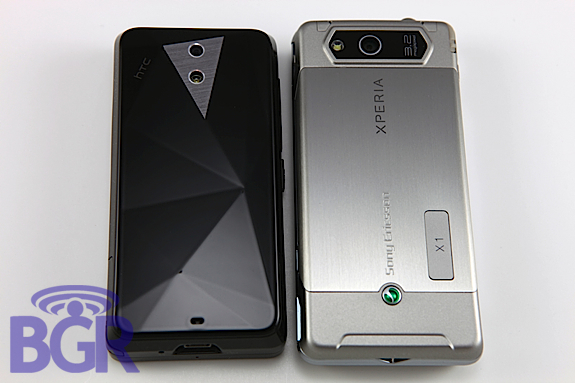
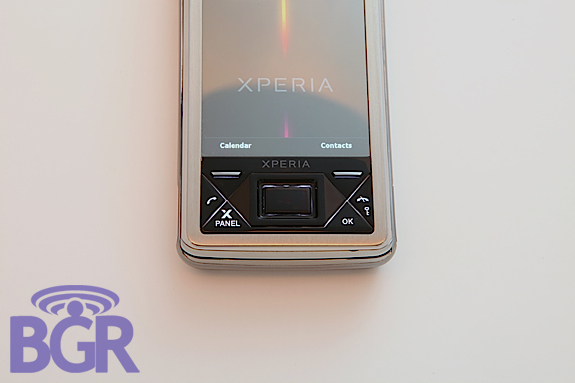
Beauty is the eye of the beholder, right? This one’s going to be tough to judge as y’all probably have more than your own opinions (anyone ever looked at our comment sections before?), but if we had to give you our take, we’d say the X1 is simply the sexiest Windows Mobile device out there. That’s not an insult to HTC either, they built the thing. The Fuze is a little more understated from the front, but we love the diamond back, though some people would have preferred the flat one that didn’t pickup an ant’s fingerprints, we dig it.
The X1’s backside is a little too “Sonyish” for out tastes, it reeks of the P-series, and while that might not be a bad thing, it sort of takes away from the beautiful aspects of the phone. The triangle front navigation keys, the sexy-crafted angled aluminum keyboard, and the very sleek polished aluminum bezel around the handset.
The Fuze isn’t an ugly duckling, and the all polished device really looks professional yet sexy. The all black theme works wonders for it as well. And while the casing is metal on the Fuze, we’d have to go with chrome/polished aluminum over gun-metal glossy black. But hey, we’re just speaking for us. Go on with your bad self and lust over whichever device you want to!
Navigation:
Sony XPERIA X1a:
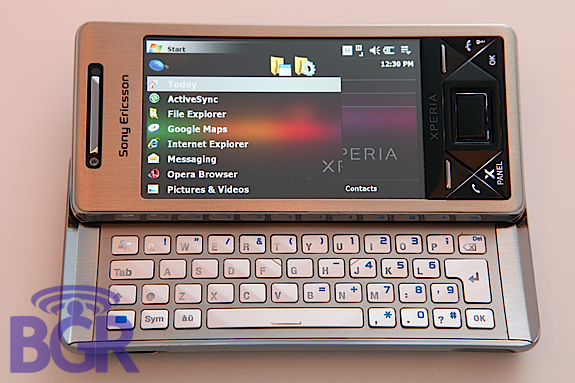
The X1 uses the beloved (at least by us) optical joystick. You won’t see an onscreen cursor here, but you will be able to do pretty much all your navigating with the optical joystick. Some nice tweaks by Sony (or HTC, we might add) include using the optical joystick to scroll in the browser in a page up / page down mode instead of selecting individual items. This works great because you can scroll to wherever you want to go, and then when you need to actually select something, hit the up/down/left/right key and select with the optical joystick (yes, it’s a real button also, that pushes in). There are no arrow keys on the keyboard however, and at first this is pretty annoying. Once you get used to navigating with the optical joystick though, it’s really no problem. You just keep one hand on the joystick instead of on the non-existent arrow keys on the keyboard.
AT&T HTC Fuze:
Out of the box, the Fuze offers a 5-way directional pad with a circular touch wheel. The problem is that the touch wheel doesn’t really do anything besides zoom in and out in Opera, or increase text size in emails, and so on. To get it to work like a scroll wheel, you have to hit up XDA and get your freak on. That’s fine with us, but for the average user that just buys a phone and keeps it stock, that won’t work so well.
Touch:
Sony XPERIA X1a:
The X1’s screen, like we said before, requires a much lighter touch to register touch input and this is really preferred in this neck of the woods. You get very fluid touch movements that are easy to control. This makes it more prone to user error if you aren’t careful, but once you get used to the thresholds, it’s very nice to use. The X1 does use a form of TouchFLO for scrolling, so you can simply swipe in any directions and phone will continue that touch interaction for you. One of the negatives about the touch screen really doesn’t have to do with the touch screen at all, rather how it’s placed. The screen isn’t flush with the casing, and while it doesn’t make or break the phone, it does make it a little annoying when you can’t seem to hit the start menu or “X” button just right because it’s sunk in the corner of case.
AT&T HTC Fuze:
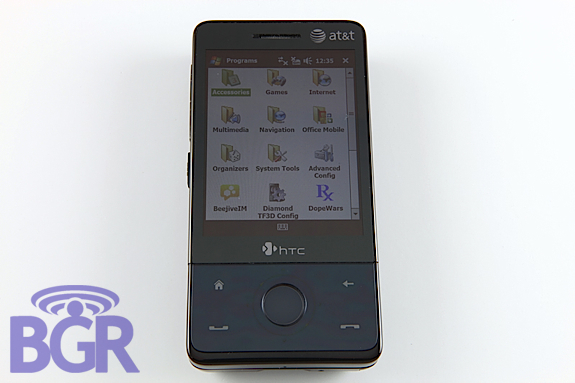
HTC’s Fuze requires a stronger touch to register input, and while it’s cool that you can get away with lightly touching the screen to wipe it clean, or not accidentally hitting buttons while you are talking on the phone, we think it requires a little too much force. We’ve begged HTC to integrate capacitive touch screens into their Windows Mobile phones, and while that might be a pipe dream (there’s too many damn tiny check boxes in the OS to make a capacitive screen effective at this point), the touch should require so much… touch. The good news is that HTC’s screen is flush with the front panel and this makes our problems with the X1 seem like much bigger problems — the layout is great here on the Fuze.
Conclusion:
At the end of the day, what phone is better? That’s the ultimate question isn’t it? I personally crowned the AT&T Fuze as the best Windows Mobile device out there. Am I sticking to it? More or less, yes. Here’s why… The XPERIA X1 is a fantastic Windows Mobile phone. But the more we use it and evaluate it, the more we think its target market shrinks. Not so much because the device is sub-par, it’s quite the opposite. It’s just that we feel the only consumers interested in the X1 will be prior Windows Mobile users that know what they are doing and know how to handle the shortcomings in WinMo. Then there’s the $800 price tag which will certainly push a huge segment of the target market away. Like real, real fast. Looking at both of them from a consumer’s perspective, there really isn’t any reason to not go with the Fuze. Even if you’re not on AT&T, paying $500 for an unlocked unit is still better than paying $800.
The Fuze offers a much more complete experience than the X1, and that combined with the price really makes this a winner. If we eliminated price altogether, which one would we choose? That’s really tough, folks. The fact is we’d be happy with either one of them, but at this point we’d probably just go ahead and choose the Fuze. It’s much more streamlined, the entire OS is cohesive in terms of what HTC has done (everything from the volume up/down screen, to the Connection Manager, to TouchFLO, to well, you get the point) and it’s just an all-around more usable phone out of the box. If you want to man up and get your hands dirty with customizing the X1 and making it suit your needs better, more power to you. We’ve pretty much raped this handset and got it up to snuff, we just don’t think that many people want to be bothered with doing that. Not with Android, Symbian, BlackBerry and the iPhone around.