
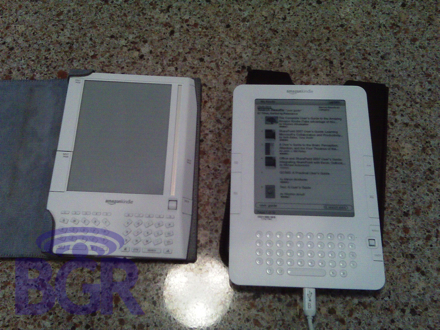
Amazon Kindle 2 e-books its way to BGR
Yes, people. You’re looking at the first shots of Amazon’s Kindle 2. The follow-up to their popular e-book reader. Our ninja sent us a ton of shots, and we have to admit, they look pretty good. The unit didn’t go down too much in size which is unfortunate, but then again, you want something pretty large so it’s comfortable to read on. He says that the unit is a little wider and a little longer, but it should help those that thought the first unit was a little too awkwardly-shaped. What’s even better is that with the new unit, while holding it, you won’t accidentally flip the page like the old one. Hit the jump for the rest!
As far as buttons go, on the right side, the bottoms from top to bottom are: Home, Next Page, Menu, a joystick, and Undo. On the left side, there’s Previous, Page, and Next Page. We’re told the buttons are significantly smaller to avoid accidental page turning. The joystick takes the place of the scroll wheel and it “takes a little getting used to.” As far as the redesigned keyboard… it “has a good layout, but lettering on the keys could be darker.” Continuing our tour around the unit, next to the sliding sleep button, there’s the headphone jack, and on the right side edge you’ve got the volume up/down buttons. What’s interesting (and you can see this in the photos) is that the backside of the unit is mostly metal with the speakers at the bottom pf the back. One more plus? They’ve finally ditched their own charger. The Kindle 2 is able to be charged with a miniUSB cable.
Our ninja didn’t have a pocket ruler, but he said that the size of the display is approximately the exact same as the original Kindle even though at first glance it looks a little smaller. What might be a little troublesome is the fact that the battery does not look to be user-accessible, and there’s no more SD card slot. In the top left corner of the device, it gives you a display of how much memory is left, and our guy’s unit showed 1403 MB. Lastly, it still uses EV-DO for downloads, and it comes with a leather pouch as opposed to the binder-style piece of nonsense that would constantly let the unit fall out. All in all, the unit is thinner, has a slightly heavier feel, and it feels much sturdier. Mr. Badass Ninja doesn’t like the metal back, and he’s not convinced on the joystick yet. That’s all for now, folks! Thank our ninja in the comments, and let us know what you think. Shots are of course in the world-famous BGR gallery
Thanks, BCU1!





Thanks, Ninja! Is this a prototype or something they expect to ship soon?
Permalink | Reply
It looks like they took a step backward with that thing. I liked the look of the first one better.
Permalink | Reply
It looks like part of the back may slide off like the current Kindle. Hopefully thewre is an SD a lot and a user changeable battery in there. This is not significantly better to make me want to ditch my kindle, which is still my favorite thing ever.
Permalink | Reply
funny… i think it looks a lot better, and am more likely to buy it. sony’s new reader looks nice as well, but like usual it seems *very* PC centric (less friendly to the linux/os x world)
Permalink | Reply
oooo…dissapointing.
I have wanted a Kindle but heard the new one was coming out so I’ve been waiting - I’m unimpressed.
Permalink | Reply
All I can say is yuck. That doesn’t look comfortable to hold at all. And where is the scroll bar? I love the way the scroll bar on my Kindle works. Looks like a Kindle mugged an iPhone and everyone lost. Boy am I glad I bought my Kindle when I did, I would not want that thing. It’s amazing there is so much wasted space on it, why for goodness sake? And I find the beveled edges of the current Kindle comfortable. Looks like a giant leap backwards for the Kindle.
Permalink | Reply
any word on a backlight? I know, I know, battery life. just gimme a switch.
Permalink | Reply
What in the fuck is that ugly piece of shit? I love shopping at Amazon, and maybe they should take a look at the Sony touchscreen E-Reader for an overhaul at what looks like a ripoff of the first Nintendo Gameboy released. The Gameboy winning out by a light year in terms of style.
Functionality doesn’t always win out above all else.
If I just had my Blackberry Bold, I would go away…
Permalink | Reply
I’ve been trying to convince myself to get an e-reader of some sort and…. this isn’t helping.
*sigh*
Permalink | Reply
My wife has my christmas list with a kindle at the top. I hope this thing makes it out in time for the shopping season. Going to suck if it’s not.
Permalink | Reply
I have the current Kindle and really like it. It’s but ugly though and the new version doesn’t seem to have improved too much. I think I’ll take the Sony this time.
Permalink | Reply
dude, the new version looks a million times better than the old one. no idea how it’ll feel in hand from the photo, but it looks much better.
Permalink | Reply
If this is for real, I am unimpressed, and very disappointed . While in some ways it has a nicer look, as a user of the first generation Kindle, I know first hand that half the complaints are crap by people who can’t be bothered to learn to hold it. The things people most complain about are what make it truly easy to use - the size, the heft, (the binder), the large buttons, the scroller, the positions of the keys, all are perfectly positioned so you don’t have to constantly move your hands to hit anything. You can hold the device in multiple positions and always have everything exactly accessible so the reading is paramount, because the interface disappears - as it should be.
Which is why the complaint about appearance being ugly is crap as well - the color and overall blandness of the device make it that much more obvious that the screen is what is important. The device is intentionally “boring” because you don’t /want/ to look at the face/buttons. You want to look at the screen. Having tried the so called superior looking Sony, I can tell you it is distracting when reading. That is a big no-no. You can get away with glossy colors when using a backlit screen - but not a front-lit e-ink. Which is why you will almost never see glossy silver borders on pages of physical books - it just doesn’t make any sense except for special editions which are mostly for show - not for use.
Now, while the buttons could be shortened to give better grab areas, I am pretty sure as based on the pictures, that making them as small as they have will make the device far less useable, because you can no longer hold the device in a comfortable position. Similarly the joystick is a step back from the scroller, which can be used via thumb without reposition. The keypad keys are very obviously less accessible while holding in a read position. I could be wrong, without getting my hands on one I can’t be sure. But just based on those shots the positions and sizing look very wrong for real use.
And yes, while the original binder holder doesn’t hold it as tightly as it should, it is way better than not having one at all, and replacing it with a slip cover would be a daft move vs simply fixing the binder. The binder allows a far more comfortable one-handed hold than can ever be accomplished via slick metal and plastic, as well as offering better protection against small drops. The binder is much like the 3rd party iPod covers which almost everybody uses - improved grip, better protection, and a nice outward appearance - only even more vital.
Permalink | Reply
I really don’t care about design, I only care about functions.
What I am hoping for is a Kindle that works unlocked on HSDPA so we can get it over here in Europe.
I want a touch-screen to make annotations using a stylus. I want to be able to handwrite the annotations and instantly share them over the Internet using annotations sharing algorithms.
I want WiFi as well.
The software should provide API direct access to all blogs using a totally basic RSS feed reader which automatically synchs and checks for new blog posts and can be setup to make a little noise, light or blink some led light or show an icon when new posts are available in one of the favorite feeds. It should connect directly to other sources for electronic books such as Project Gutenberg and Google Books.
It should connect using some type of API to Google Blogsearch and to Google News as well. With touch-screen to click on articles.
Some ratings system should make it possible to recommend new blog posts, new news articles, new books to read.
A $10-20 monthly subscription service should give unlimited access to all books, all newspapers, everything.
Permalink | Reply
thanks so much, ninja! and thanks BG for posting.
Permalink | Reply
Black-and-white, fugly LCD; craptastic white plastic; and Chiclet keys are bad enough.
But pay for built-in DRM (Diminished-Rights Management), too?
When will you suckers learn?
Permalink | Reply
Vs the new Sony PRS-700 Reader
“Let’s look, first, at who attended. Along with the press were
representatives of Harlequin, Penguin, Random House, Hachette and
Harper Collins. What does that tell you?”
“In addition, Steve Haber, President of Sony’s Digital Reading
Business Division, reported that there will be a major update to
their ebook store by the end of October, including a better look and
a vastly improved search function. He said that there are currently
about 50,000 books in the store and he is going to have about 100,000
by the holiday season. (Note the publishers I mentioned above.)”
“Last year Sony had about 700 outlets for the Reader, this year they
are expecting to have about 3,000 in the holiday season. Further,
they have hired 1,000 people to do in-store trials and demos and to
introduce the public to the Reader.”
“Two further things. The new Reader is fast, fast and faster.
Compared to the older Reader and the Kindle it is like a Ferrari vs.
a bicycle. It is amazing how quick it is. Also, there is no flicker
or “blink” when you change pages. This is a major ergonomic
improvement over earlier versions. A representative of E-ink, who
makes the screen, was at the event and I cornered him and asked him
how Sony accomplished this. He said it was a combination of Sony
proprietary technology and some small improvements in the E-ink
screen. Primarily, he said, this is a result of Sony’s expertise in
writing an optimized driver and in designing the display chip and
optimizing timing issues. This, I would guess, is going to be
extremely difficult for competitors to do for themselves.”
“Finally, there will be a wireless version. Steve said this is down
the road because they want to launch wireless on a open platform.
That is one that will have different bookstores and book suppliers,
not just the Sony store. This will take a bit of time to set up. No
target date was given.”
http://www.teleread.org/blog/2008/10/03/new-sony-reader-and-a-renewed-commitment/
Permalink | Reply
I’d be very surprised if those weren’t photos of a fake.
Permalink | Reply
Steve Jobs please save us!
Permalink | Reply
$400 for a reader!!! One would think they would have downsized it and lowered the price. A Palm T/X with its built in WiFi fits the bill for a perfect reader plus all the normal features of the Palm thrown in.
Permalink | Reply
Dudes, that metal back looks removable to me… I’m betting the SD and battery are user accessible via the obvious coin slot opener at the bottom of the unit. But, that said, this looks more like a Kindle 1.5 than a 2.0. The only real improvements are button size and mini USB charger. I, too am leery of the joystick, but let’s wait and see before we judge, hmm? I’ll be looking for a true hands on before I freak out about it.
Johnny U, if you want to read books on your Palm, you go right ahead. There’s a career in microsurgery just waiting for you! The Kindle is BUILT to be a reader, and as such, does a great job!
I have some comments on covers…. the iPod does not come with a cover. We are all expected to protect our devices on our own dime. Yep, the cover the Kindle comes with is kaka… but M-edge makes a rockin cover that is supple red leather creamy goodness that has never let my Kindle flop out. So you could argue that at least Amazon TRIES to give you a cover… Apple leaves it to you…
Permalink | Reply
Amazingly ugly machines.
Permalink | Reply
Something doesn’t look right with this.
While I can believe that the cover on the back might slide off to reveal a battery & SD card slot where is the “Turn off the wireless function” button? Has it been folded into the software? You need to have that function for 2 reasons:
1) If you want to use the unit on an airplane you have to be able to turn off the EVDO transmitter.
2) It’s a battery saver when you’re out of range or just don’t want your blogs or other subscriptions updated.
I do not believe that Amazon would remove the ability to turn off the wireless independantly of turning off the unit in its entirety.
Permalink | Reply
I too think maybe this might be a fake.
There is little improvement from the first edition.
That being said. I LOVE my Kindle. I wouldn’t switch to this “new” edition just from these pictures.
Permalink | Reply
Amazon has some great engineers to think of something as useful and creative as the kindle but they really need to get a better design team. The new one looks worse than the old one I think. They truly have a great product if they could just make it look more like the high tech gadget that it is.
Permalink | Reply