ASUS N10 notebooks get scooped
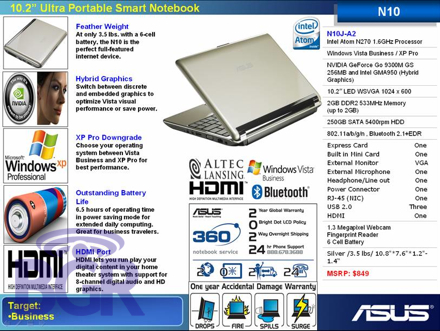
We just got our hands on some interesting photos of the upcoming ASUS N10 notebooks set to be released the third week of this month. For starters, they’re pretty tiny. You know, with them rocking 10.2″ screens and all… In terms of specs and features, here’s what we got from the leaked docs:
- 10.2″ LED 1024×600 screen
- Windows Vista / Windows XP
- 1.6GHz Intel Atom CPU
- NVIDIA GeForce Go 9300M GS 256MB graphics card
- 2GB RAM
- 250GB 5400rpm HD
- One ExpressCard slot
- One HDMI port
- Three USB 2.0 ports
- 1.3 megapixel webcam
- Fingerprint reader
- 3.5 lbs
You also get around 6.5 hours of runtime with the included 6-cell battery, a switch to toggle either the built-in motherboard graphics, or the sexy NVIDIA chip, Altec Lansing speakers, and a totally cool face recgozition software that will enable you to securely unlock your PC. That sums up most of the specs, but what about price? Well, the specific model we listed above is the ASUS N10J-B1 and will retail for $849 in the next couple weeks, but look for the N10J-A1 to retail for $749, and the N10E-A1 to run you $649. Check out all the slides in our gallery, ok?
Click on over to our ASUS N10 notebook gallery!


no optic drive WTF? no wifi adapter either bout the only things that make it worth buying ar the battery life an th 250 gig Hard disk plug an atheros card an load up som linux id be good for wardriving
Why would you want to wardrive? Its 2008 man. Get a prepaid AT&T sim, activate medianet on it for $20 a month, no contract, no hassle. Drive anywhere you want with practically free 3G. Why even bother wardriving for crappy DSL and capped Comcast cable? WHY MAN, WHY?
Where did you get “no wifi adapter either”? Without even enlarging the image on this page, I can see that it says 802.11a/b/g/n on the right column of the slide.
@ jigmnann their ain tnl comcast out her just Cox cable good chunk of it’s un encrypted qworst and att DSL and some T1’s and an e3 connection.
besides att is capped and I”’m still looking for work
If you’re still “looking for work”, then what the hell are you doing here? Get out there and find a job instead of wasting time online.
Anyone else notice that in image 5 the keyboard looks like it has a full number pad to the side?
whats with the huge like xbox bezel on the lcd
Pardon my ignorance but how can you install applications without optical dive?
IL: It’s pretty easy — just get an external USB disc drive. I bought one from LG a while ago for less than $100, and it works perfectly without even plugging it into the wall (runs off the USB power). Sure, it does add a bit of cost to these kinds of computers but I’m willing to live with it.
It’s also entirely possible to simply subsist entirely off of digital distribution, as it’s quite easy to find all the software you’d need by purchasing online or using open-source software.
studying the pictures, I see the arrow keys next to the space bar in a few pictures, and then a few keys away. What? It gets worse. I see a full number pad next to the arrow keys in one picture, but the overall pictures show the arrow keys next the edge. What gives BGR? First time to the site, and am not impressed with the fact finding.
@Galvatron Look at the screenshot. It qoute clearly says 802.11a/b/g/n – It’s got WiFi.
Anyway, I’d love to get myself one of these. It’ll be a good replacement for my outdated EeePC 701.