Windows Mobile 6.1 Standard in 100 pictures

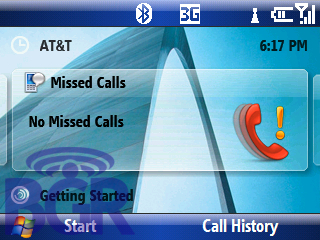
Can’t believe we missed this! The brand new Motorola Q9 with Wi-Fi we just got? Yeah, that has Windows Mobile 6.1 on it! We’re getting the video up soon, but for now, check out our full Windows Mobile 6.1 gallery, and the new things we found!

  • Copy / Paste (finally!)
  • Domain Enroll in Settings (Enrolling in a domain will connect your device with company resources.)
  • New home screen (pan left and right to check out missed calls, notifications like email, sms, etc.)
  • Change Master Security Code
  • Added text input settings
  • Recent Programs when pressing Start menu
  • Threaded SMS!
  • When you compose an email, or SMS, and start typing the name of the contact in the "To:" field, the contact names finally pop up like Windows Mobile Professional!
  • Internet Explorer now lets you define a homepage, and also zoom in and out using a nice and clean interface

Click on over to our Windows Mobile 6.1 gallery!

Share / E-mail This

33 comment(s) for this post.

Pages: [1] 2 »

  1. On Dec 3, 2007 @ 4:21 pm, Randy Said:

    I think it’s time ditch my BlackJack. I generally don’t dig Moto Phones, but I may make an exception in this case.

    Thanks for Coverage BG!

    Permalink | Reply

  2. On Dec 3, 2007 @ 4:54 pm, TC Said:

    Im interested into how the WM6.1 Pro will look. Reports are that it looks v different than the current version.

    Also the new marketing camp again here:
    http://www.microsoft.com/windowsmobile/startdoingmore/
    looks v different in the GUI, more vista/mac ish.

    Any idea ehre this start doing more stuff came from? is it the marketing department trying to make win mobile look less dull, or is it going to look different?

    Permalink | Reply

  3. On Dec 3, 2007 @ 5:49 pm, yourdaddy Said:

    Micro$haft is doing anything it can to try to spark any interest in windoz mobile. To bad the new moto is running it, not only does it look like sh*t, if it’s anything like the older versions of wm it also functions like sh*t. No wonder why Zander is on his way out at Moto.

    Permalink | Reply

  4. On Dec 3, 2007 @ 6:32 pm, marco Said:

    same features and icons than t-mobile shadow

    Permalink | Reply

  5. On Dec 3, 2007 @ 6:59 pm, Jeff B. Said:

    I want that for my Tilt.

    Permalink | Reply

  6. On Dec 3, 2007 @ 7:30 pm, jrrizzle Said:

    yourdaddy-I guess it is your belief that companys or people, should not be interested in constantly improving there product or self?

    Your reponse sounds extremely un educated.

    Permalink | Reply

  7. On Dec 3, 2007 @ 7:40 pm, Jeff B. Said:

    Do you know when it’ll be out?
    Where can I get it once it does come out?
    Is this gonna be on like the Microsoft Update deal under settings under the system tab?

    BG, this is freakin’ sweet I have to know!!

    Permalink | Reply

  8. On Dec 3, 2007 @ 9:36 pm, tmo_nick Said:

    I was going to say some of those icons and stuff look familiar to whats on the shadow…..

    Permalink | Reply

  9. On Dec 3, 2007 @ 9:38 pm, tmo_nick Said:

    in addition it basically is the shadow ui integrated into the standard wm6 home screen…..

    Permalink | Reply

  10. On Dec 3, 2007 @ 9:46 pm, Chris Said:

    6.1 is interesting

    but 7.0 is gonna be wicked i wish they would set a release date though from what i hear the closed door meetings astonished the reviewers that actually were allowed to see it. i remember one guy said it was actually breathtaking especially for a phone UI

    Permalink | Reply

  11. On Dec 3, 2007 @ 10:03 pm, rosegold Said:

    threaded sms!! finally i hope they professional version has this too

    Permalink | Reply

  12. On Dec 3, 2007 @ 10:53 pm, Mart Said:

    This looks really bad… I’m not a Windows guy but I have to guess the older WM was even worse?

    Permalink | Reply

  13. On Dec 3, 2007 @ 11:12 pm, David Mackey Said:

    Sure would like to get my hands on 6.1 to play with. Thanks for the pictures!

    Permalink | Reply

  14. On Dec 3, 2007 @ 11:14 pm, ohmy Said:

    ooo threaded sms can i flash it to my blakjak…dont have a blakjak 2 although i stronly dislike my phone would be nice to play withese new features

    Permalink | Reply

  15. On Dec 4, 2007 @ 4:51 am, billy Said:

    is it a real product or somekinds of RC or engineering samples?

    Permalink | Reply

  16. On Dec 4, 2007 @ 5:40 am, WM Guy Said:

    I agree. I am currently using WM Pro device but I hate its stupid and ugly interface every day. They are not even following simple UI concepts. Every simple operation takes lots of clicks to complete. And why the icons on the status bar is separated? It is just ugly.

    Permalink | Reply

  17. On Dec 4, 2007 @ 10:16 am, BigB Said:

    BGR,

    Does this update have options to set notification options for email addresses individually (like the blackberry ??)

    thanks

    Permalink | Reply

  18. On Dec 4, 2007 @ 1:04 pm, E@zyVG Said:

    I wonder whether there will be a Professional version of WM 6.1

    Permalink | Reply

  19. On Dec 5, 2007 @ 3:37 am, John Said:

    So when is that said video coming??

    Permalink | Reply

  20. On Dec 5, 2007 @ 2:36 pm, Brian Said:

    Seriously, we’re all jonesing for the video since the double-post regarding screenshots!

    Permalink | Reply

  21. On Dec 5, 2007 @ 2:47 pm, Sarah Said:

    Will the new browser play video and audio (all flash) on any site or is it the same stinking IE browser?

    Permalink | Reply

  22. On Dec 5, 2007 @ 4:34 pm, Fuchsteufel Said:

    Cut/Copy/Paste… spectacular, wow :)

    Now if we could just get a clock AND a battery on the status bar :/

    Permalink | Reply

  23. On Dec 5, 2007 @ 5:56 pm, JW Said:

    all those cool graphics in 6.1 dont mean didly squat. how bout some real meet in these super duper phone/pda’s like being able to set security parameters like being able to add port 587 for smtp with ssl. or even 995 for incoming???????

    Permalink | Reply

  24. On Dec 6, 2007 @ 5:03 pm, Bill Said:

    Hmmm… wi-fi on a Q… wonder if that’s a new feature for an upgraded Q9h?

    Permalink | Reply

  25. On Dec 14, 2007 @ 5:25 pm, Alex Said:

    This article incorrectly states that cut and paste is new in WM 6.1. It has been available for at least 6 months with WM 6.0 Prof. Users just highlight the text and hold down their stylus (or finger) on the touch screen. A menu appears allowing the user to cut and paste.

    Permalink | Reply

Pages: [1] 2 »

Leave a comment on this post.